Desk FT
Features

Eight modules.
One desk per client.

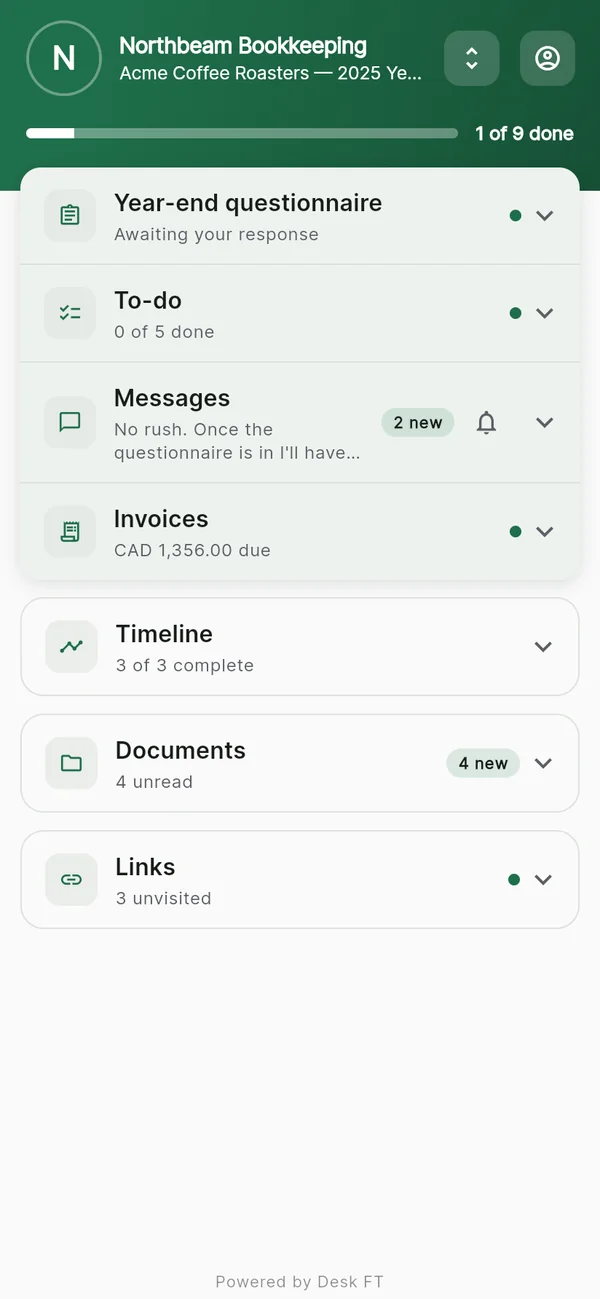
A bookkeeper's desk might be a checklist, documents, messages and invoices. A tutor's might be appointments and a prepaid lesson package. Turn on what each client needs. Here's exactly what each module does.
01 Timeline 02 Documents 03 Form 04 Checklist 05 Links 06 Appointments 07 Messages 08 Invoices
MODULE 01 / TIMELINE

Timeline.

The steps from start to finish, in order. Your client sees where things stand without asking, and gets a reminder the day before anything is due.

✓
Milestones with due dates — overdue ones are flagged so nothing slips.
✓
Reminders that send themselves — your client gets a push notification and an email the day before a milestone is due.
✓
Mark it done — your client is notified when you complete a step.
✓
Starts filled in — pick "Personal tax return" and the timeline already reads Documents received → Return in preparation → Review call → Filed.
Replaces Status-update emails "Where are we at?" calls WhatsApp voice notes
AC
Timeline · Personal tax 2025
2 of 4 complete
OPEN
✓
Documents received
Mar 11
✓
Return in preparation
Mar 28
Review call
Due Apr 8
Filed
Due Apr 30
MODULE 02 / DOCUMENTS

Documents.

One place for every file between you and this client. They upload from their phone or computer; you send drafts back. No share links that expire, no attachments lost in an inbox.

✓
Both sides upload — PDFs, photos, spreadsheets, scans. Each file shows who uploaded it and when.
✓
Opens in the app — PDFs and images open right on the phone.
✓
You hear about it — you get a notification the moment your client uploads something.
✓
Private to the desk — files are encrypted at rest and only you and that client can open them. 1 GB of storage per account.
Replaces Drive share links WeTransfer "Resending — see attached"
AC
Documents
4 files
OPEN
PDF
2025 return — draft.pdf
uploaded by you · today
2.4 MB
PDF
T4 slip 2025.pdf
uploaded by Alex · Mar 11
96 KB
PDF
Bank statements Jan–Dec.pdf
uploaded by Alex · Mar 11
1.8 MB
JPG
Donation receipt.jpg
uploaded by Alex · Mar 4
310 KB
MODULE 03 / FORM

Form.

The questions you'd otherwise ask by email: intake, a year-end questionnaire, a check-in. Write them once; your client answers in the app, and you get tidy answers instead of a text at 11pm.

✓
Five kinds of question — short text, long text, number, date and yes/no. Make any of them required.
✓
Send it when it's ready — your client sees nothing until you publish it.
✓
Know where it stands — you're notified when answers arrive; your client sees whether you've reviewed them.
✓
Answers stay put — once your client responds, the form locks so their answers can't drift. Duplicate it to ask again next year.
Replaces PDFs by email Google Forms links "Can you answer these six questions?"
AC
Year-end questionnaire
Sent · 1 of 3 answered
SENT
01 / YES OR NO
Did your marital status change in 2025?
Yes
No
02 / NUMBER
Share of your home used for work (%)
e.g. 15
03 / LONG TEXT
Any new dependents, or other changes we should know about?
Type here…
MODULE 04 / CHECKLIST

Checklist.

"What I need from you," written once and ticked off by your client. They see exactly what's left; you see progress without sending a single "any update?" email.

✓
Your client ticks items off — and you're notified as each one is done.
✓
Due dates on any item, flagged once they pass.
✓
Progress at a glance — "2 of 5 done" on the desk, for both of you.
✓
Starts filled in — choose "Personal tax return" and the checklist already asks for the engagement letter, T4 / W-2 slips, last year's return, receipts and bank statements.
Replaces The polite "any update?" email Lists on sticky notes
AC
Checklist · Personal tax 2025
2 of 5 done
OPEN
✓
Signed engagement letter
Done
✓
T4 / W-2 slips
Done
Last year's return
Due Mar 15
Receipts for deductions
Bank statements
MODULE 06 / APPOINTMENTS

Appointments.

Your client picks a time from your availability; you confirm or decline. One schedule behind every client, so the same slot can't be booked twice.

✓
Your hours, your length — set your weekly availability and appointment length once, for every desk.
✓
No double-booking — a requested time is held for that client until you answer.
✓
Time zones handled — you see your business hours; your client sees their own local time.
✓
Cancellation cutoff — choose how late a client can still cancel on their own.
✓
Prepaid sessions — sell a package (say, four sessions) as one invoice. Your client books each one and sees how many are left.
Replaces "Does Tuesday work?" threads A separate booking link
AC
Appointments
1 upcoming · 1 requested
OPEN
✓
Consultation — Mon 10:00 AM
Done
Review call — Thu 2:00 PM
Confirmed
Year-end wrap-up — Fri 3:30 PM
Requested
MODULE 07 / MESSAGES

Messages.

A private conversation on the desk, next to the files and the checklist. Not a text to your personal number, not a DM on a platform you don't control.

✓
One-to-one — just you and this client. No group chats, no strangers.
✓
Seen — you can tell when your client has read your latest message.
✓
Mute, don't lose it — notifications stop; the conversation stays.
✓
Report a message — we aim to review reports within 24 hours.
Replaces Texting from your personal number DMs on someone else's platform
AC
Messages
Seen
LIVE
SL
Sara · You10 min ago
Quick one — can you confirm your mailing address before I file?
AC
Alex Chen3 min ago
Just uploaded it to Documents.
SL
Sara · Youjust now
Got it, thank you!
MODULE 08 / INVOICES

Invoices.

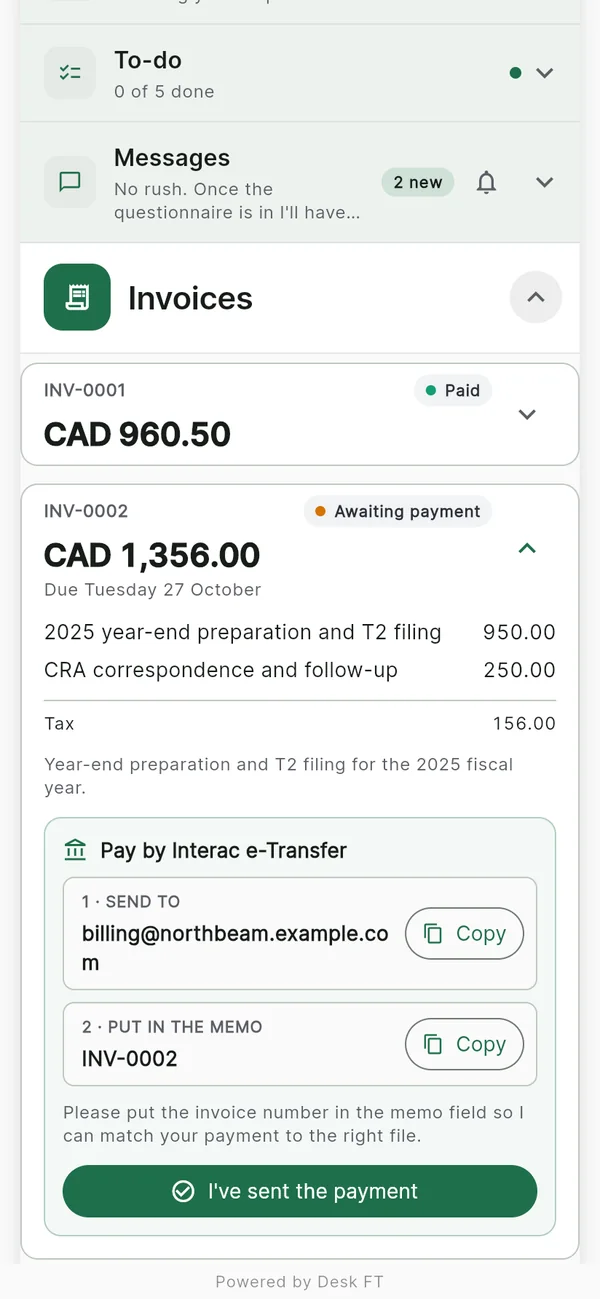
Bill a client for your work (a month of bookkeeping, a year-end, a consultation) right from their desk. They pay by card, or in Canada by Interac e-Transfer. Desk FT never holds the money and takes no cut.

✓
Card payments to your own Stripe account — Desk FT takes 0%; Stripe's standard fees apply.
✓
Interac e-Transfer (Canada) — your address and instructions with copy buttons, and an "I've sent it" button for your client.
✓
Reminders — an overdue invoice reminds your client every week, or send a reminder yourself.
✓
Line items, tax and numbering — INV-0001, INV-0002… stamped when you send.
✓
Session packages — bill several sessions at once and track how many are left.
Replaces PayPal.me links "e-Transfer to accounting@…" texted separately Chasing overdue invoices by hand
AC
Invoices
$300 outstanding · 1 overdue
SYNCED
DUE
Bookkeeping — August
sent 12 Aug
$220.00 overdue
PAID
Consultation call
paid 3 Sep
$150.00 paid
DUE
Year-end prep — deposit
sent 5 Sep
$80.00 sent
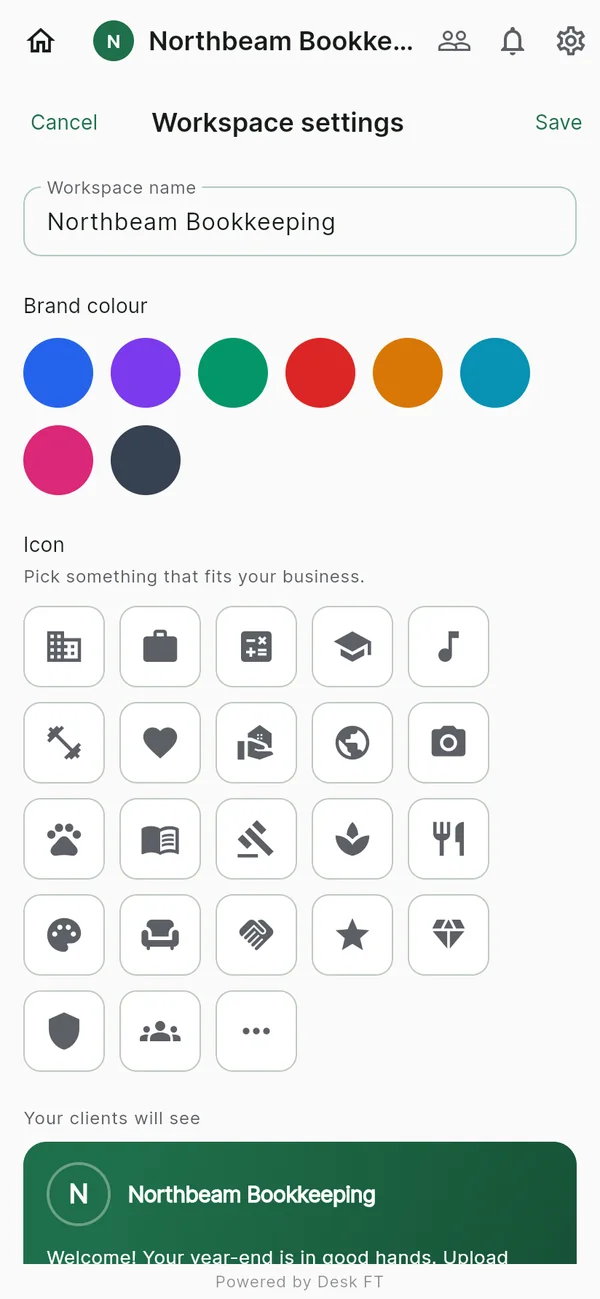
Setting a workspace's colour and icon
A client's desk
An invoice with e-Transfer payment steps
Built for the phone

You run the business. From your pocket.

Set up and run every desk from your phone, or from your computer at app.deskft.com. Your clients use the Desk FT app, or open their desk in a browser with nothing to install.

iPhone & iPad Android Web browser

Pick the modules.
Ship the desk.

Free for your first two clients. No card.